THE CONNECTED BUSINESS PLATFORM

Your business.
Moving
together.

Bring your customers, team, day-to-day work and financial visibility together. One clear view, wherever your business happens.

For hospitality, cleaning, professional services and trades.
One connected workspace
app.opebix.comSample workspace
YOUR OPERATIONS. IN ONE PLACE.Actual Opebix interface · Illustrative sample data

Actual Opebix interface. Illustrative sample data.

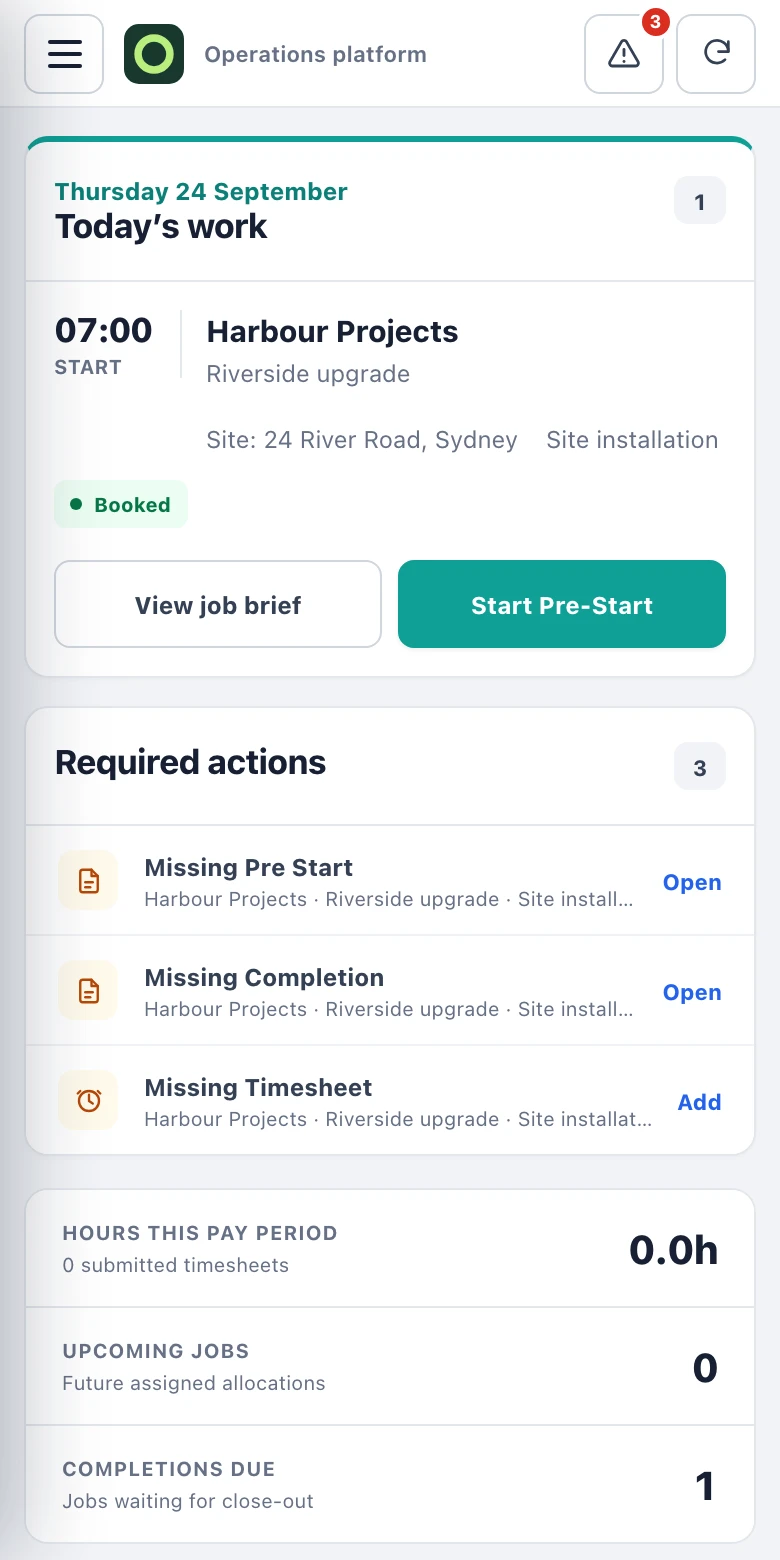
Illustrative Opebix Field Portal showing a sample job, site address, start time and required field actions. A real demo worker capture is pending.
Desktop: real Opebix demo · Field Portal: illustrative preview
Clarity for managers.
Confidence for the team.
A business moving as one.
ONE WORKFLOW. SHARED CONTEXT.

Good work starts connected.
And stays that way.

From the people organising the day to the team doing the work.
Keep everyone working from the same picture.

Follow the work
01 / IN THE OFFICE

A clear plan.
A team ready to go.

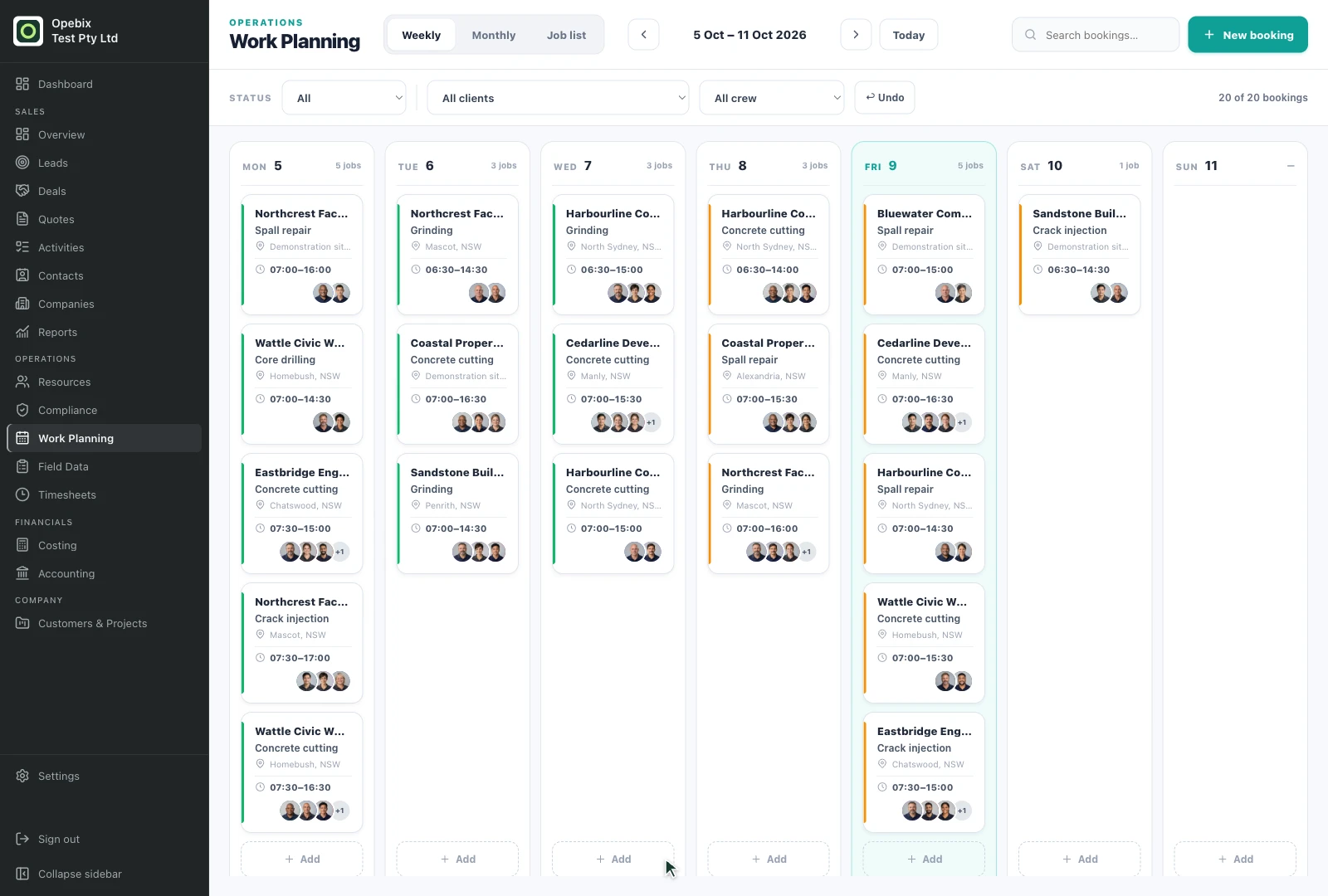
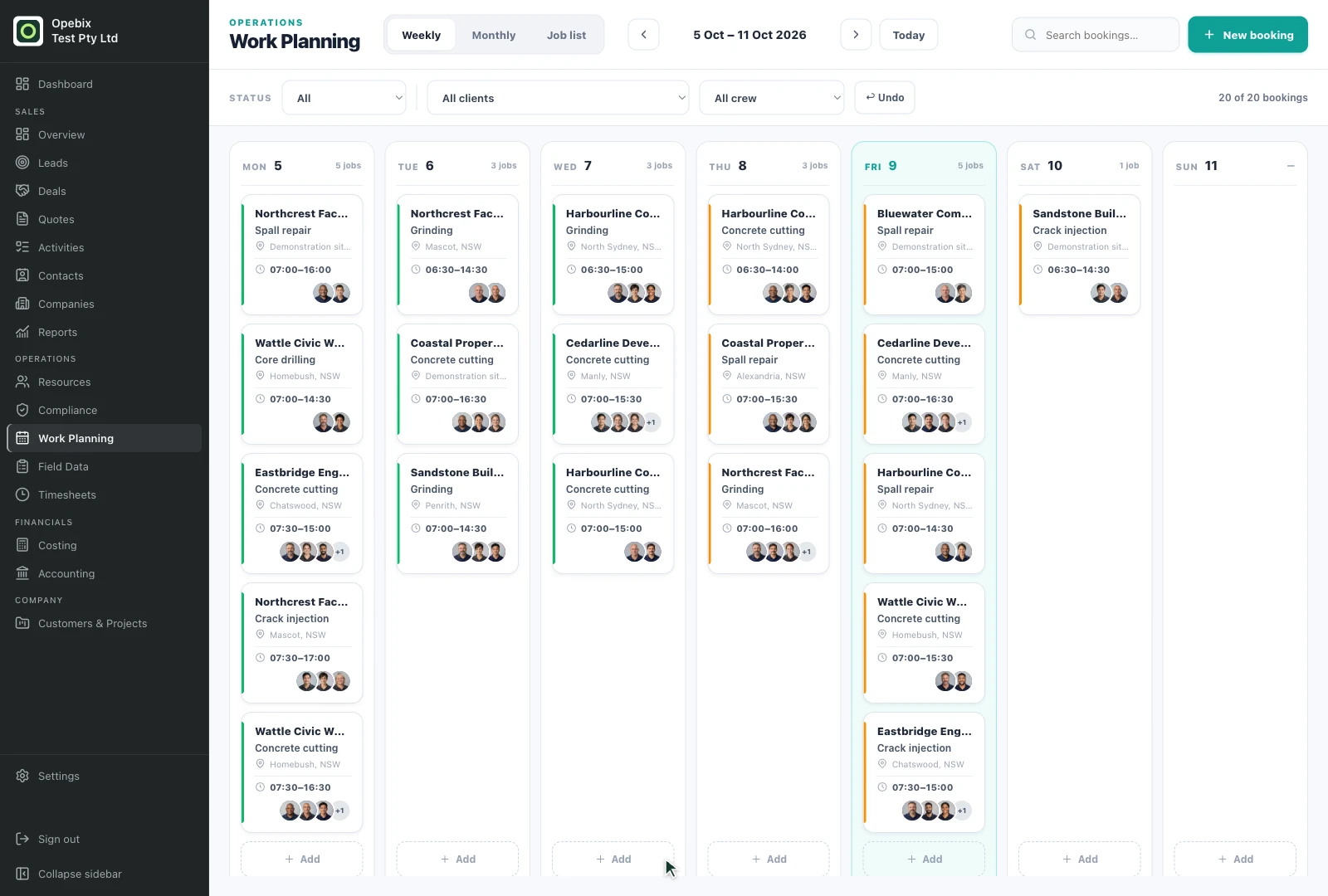
Keep schedules, team assignments and job details together. Give the day a clear starting point, whether the work happens at a venue, a customer location or a project site.

  • Jobs and schedules
  • Team allocations
  • Customer and location details
Work planning01 / 03
Illustrative Opebix Field Portal showing a sample job, site address, start time and required field actions. A real demo worker capture is pending.
Actual Opebix interface · Sample data
02 / WITH THE TEAM

The work in hand.
The office in the loop.

Give the people doing the work a clear view of their assigned jobs, start times, location details and required forms. Keep updates connected to the office, with less back and forth.

  • Assigned jobs and start times
  • Location details and contacts
  • Forms, photos and timesheets
Field Portal02 / 03
Illustrative Opebix Field Portal showing a sample job, site address, start time and required field actions. A real demo worker capture is pending.
Illustrative Field Portal · Real demo capture pending
03 / BACK IN THE OFFICE

Less chasing.
A clearer picture.

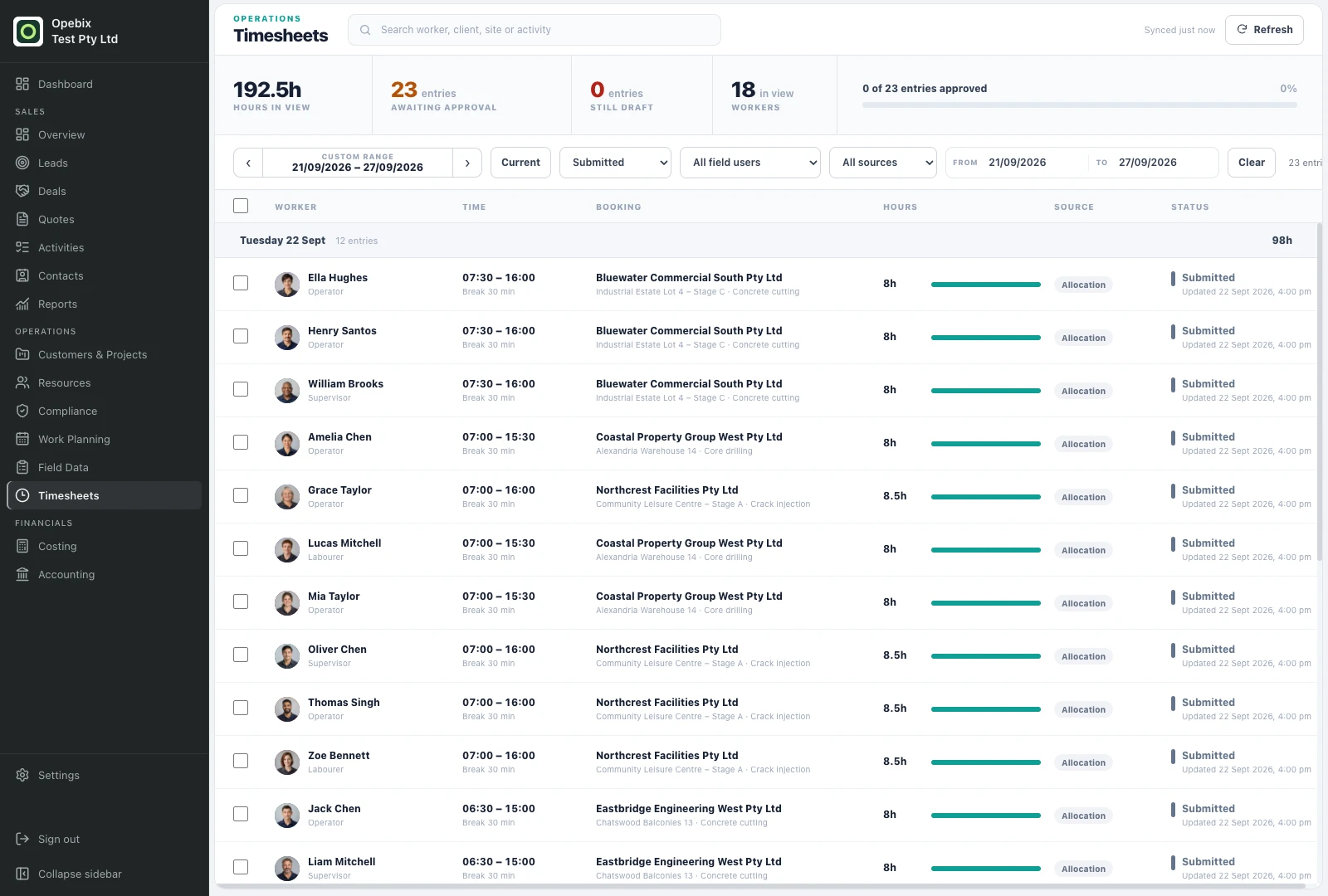
Bring submitted hours back to the office for review. See the worker, job and status together, with the detail behind each timesheet.

  • Timesheets for office review
  • Workers and linked jobs
  • Submitted hours and approval status
See it with your team
Timesheet review03 / 03
Actual Opebix Timesheets register showing fictional workers, linked jobs, submitted hours and approval status in Test Pty Ltd.

Timesheets · Office review · Actual Opebix interface · Sample data

Illustrative Opebix Field Portal showing a sample job, site address, start time and required field actions. A real demo worker capture is pending.
Actual Opebix interface · Sample data
Work planning01 / 03
Illustrative Opebix Field Portal showing a sample job, site address, start time and required field actions. A real demo worker capture is pending.
Actual Opebix interface · Sample data

Different roles. One connected business.

Explore the platform
ONE PLATFORM. DIFFERENT WAYS OF WORKING.

Your industry.
Your way of working.

Hospitality, cleaning, professional services and trades share a need to keep customers, people and work connected. Explore an example for your team.

Talk through your workflow

We’ll explore your requirements and the workflows that fit in a demo.

Hospitality & venuesVenue enquiries, team tasks and day-to-day work
EXAMPLE WORKFLOW

Keep the venue and the office connected.

Bring customer enquiries, scheduled work and team information into a shared view, so managers and the people delivering the service have the same context.

  1. 01

    Capture the enquiry

    Keep customer details, quotes and follow-ups together.

    Sales
  2. 02

    Organise the work

    Share job details and responsibilities with the team.

    Operations
  3. 03

    Review the delivery

    Bring submitted hours and invoicing into view.

    Finance
Cleaning & facilitiesCustomer locations, assigned teams and job records
EXAMPLE WORKFLOW

A shared plan for every customer location.

Keep the customer, location details and assigned work connected. Give your team a clear brief and bring job records back to the people managing the service.

  1. 01

    Know the customer

    Keep customer and location details close to the work.

    Projects
  2. 02

    Coordinate the team

    Plan jobs and make team assignments visible.

    Operations
  3. 03

    Review the records

    Keep forms, submitted hours and invoices connected.

    Finance
Events & cateringFrom the first enquiry to delivery and invoicing
EXAMPLE WORKFLOW

Keep the details moving with the event.

Connect the commercial conversation with the people delivering the work. Keep customer context, responsibilities and the next action visible as plans take shape.

  1. 01

    Follow the opportunity

    Track enquiries, quotes and the next follow-up.

    Sales
  2. 02

    Plan the delivery

    Keep job details and team assignments together.

    Operations
  3. 03

    Close the loop

    Review submitted hours and sales invoices.

    Finance
Professional servicesClient context, projects and commercial visibility
EXAMPLE WORKFLOW

Keep the client relationship close to delivery.

Bring enquiries, customer records, project details and follow-ups together. Give your team a shared reference as work moves from the first conversation to delivery.

  1. 01

    Build the relationship

    Keep opportunities, contacts and follow-ups in view.

    Sales
  2. 02

    Share the project

    Connect project details with the customer record.

    Projects
  3. 03

    See the performance

    Review pipeline, forecasts and sales trends.

    Insights
Trades & constructionJob planning, site information and office review
EXAMPLE WORKFLOW

Keep the office and site working together.

Coordinate jobs, people and site information in one workspace. Help the team see the plan and bring the records of the work back to the office.

  1. 01

    Set up the job

    Connect the customer, project and location details.

    Projects
  2. 02

    Share the plan

    Keep schedules, team allocations and job details visible.

    Operations
  3. 03

    Review the work

    Bring submitted hours and financial information together.

    Finance

Examples use Opebix’s shared customer, work planning, team and financial tools.

THE OPEBIX PLATFORM

Everything your business needs.
Connected.

One platform. A shared context for every part of your business.

01 Sales

From first conversation to won work.

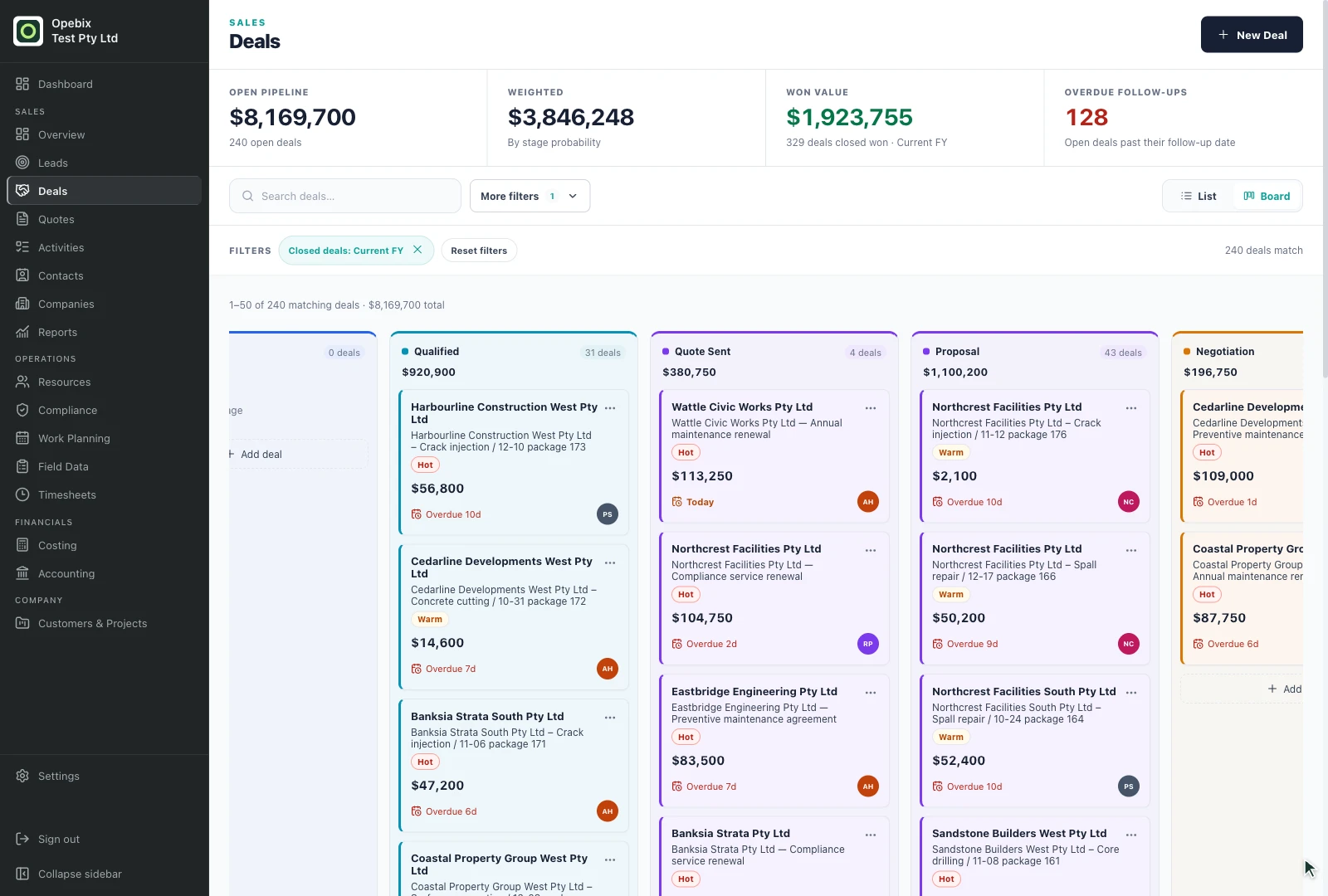
Keep leads, opportunities, quotes and follow-ups together. See where every deal stands and what needs to happen next.

  • A clear view of your pipeline
  • Customer context, close at hand
  • Follow-ups that stay visible
Explore sales in a demo
Opebix Deals · Pipeline and follow-ups
Actual product interface · Sample data
02 Projects

Give every project a clear starting point.

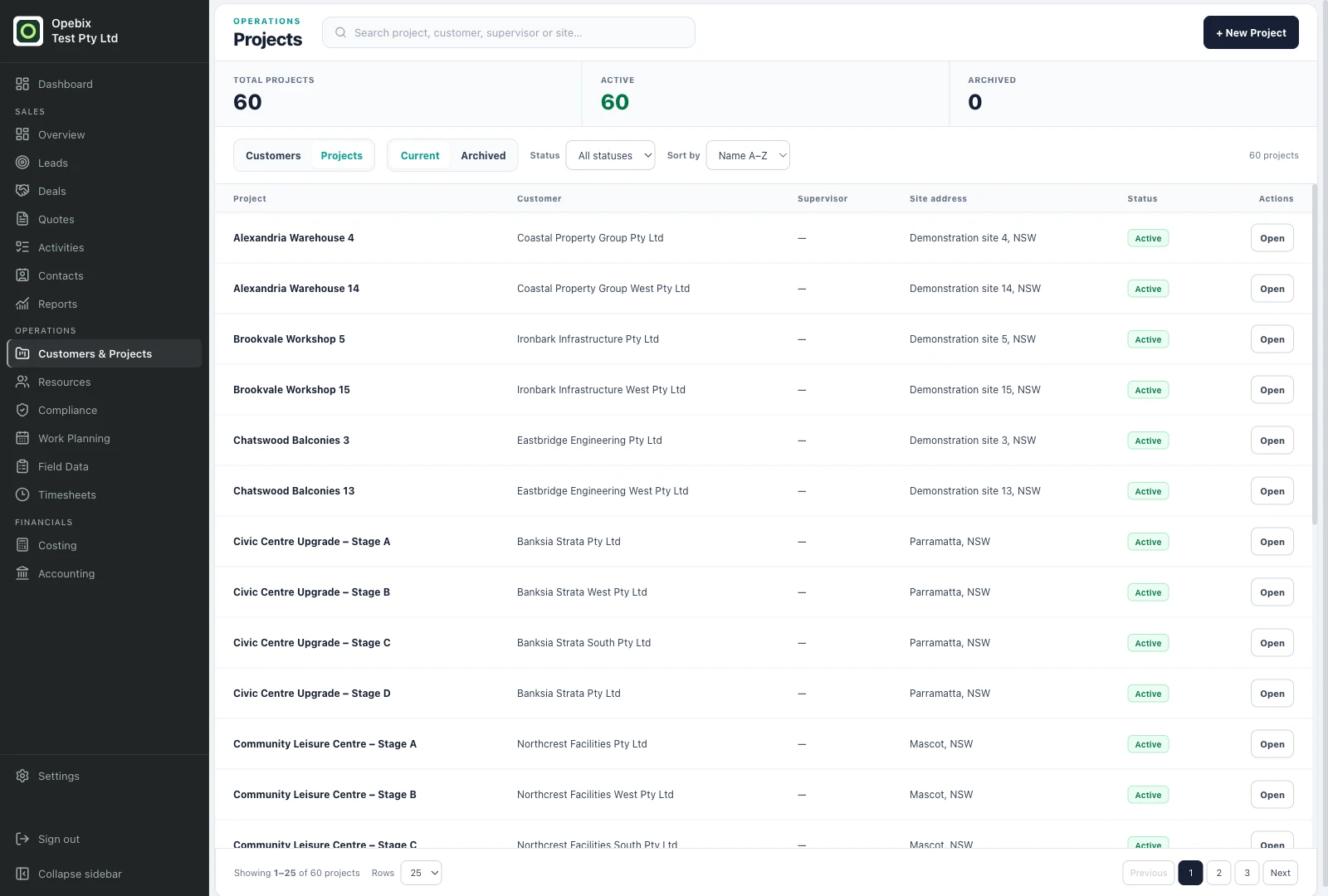
Keep customers, project names and location details connected. Give managers and delivery teams a shared reference before work is scheduled.

  • Projects linked to customers
  • Location details alongside each project
  • Active and archived project registers
Explore projects in a demo
Opebix Customers & Projects · Projects
Actual Opebix Projects register with fictional project names, linked customers, demonstration sites and active status in Test Pty Ltd.

Customers & Projects · Projects · Actual Opebix interface · Sample data

Actual product interface · Sample data
03 Operations

Make the day-to-day feel joined up.

Coordinate jobs, team assignments and job documentation in a workspace built around the work. Keep the plan and the next action visible across venues, customer locations and projects.

  • Jobs and weekly work planning
  • Job forms and documentation
  • Outstanding actions in view
Explore operations in a demo
Opebix Work Planning · Schedule and job details
Actual product interface · Sample data
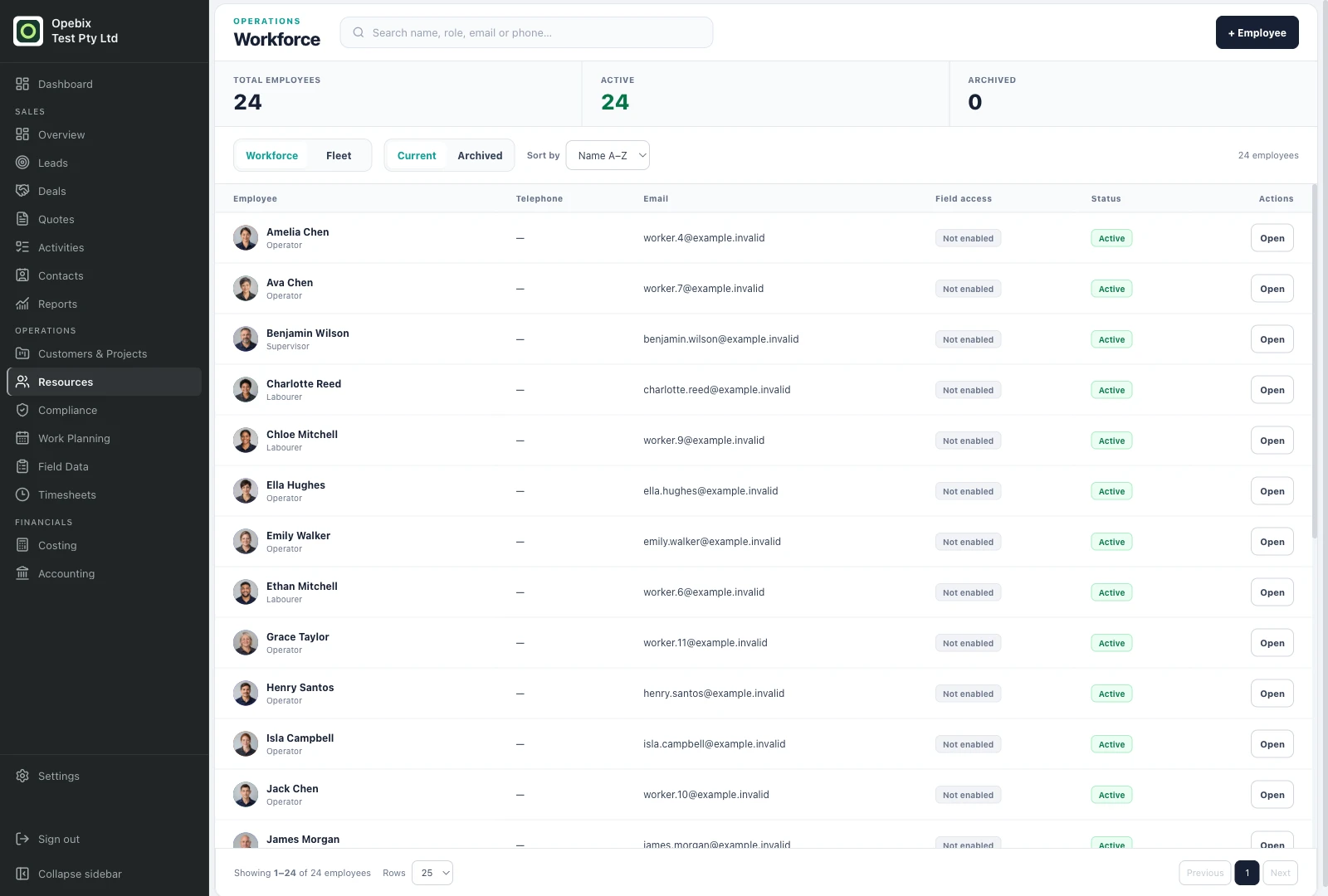
04 Workforce

The right people. A shared plan.

Keep your workforce records, roles and field access together. Connect the people in your team with the work they’re assigned to.

  • Employee records and roles
  • Active and archived team members
  • Field Portal access in view
Explore workforce in a demo
Opebix Resources · Workforce
Actual Opebix Workforce register with 24 fictional employees, their roles, field access and active status in Test Pty Ltd.

Resources · Workforce · Actual Opebix interface · Sample data

Actual product interface · Sample data
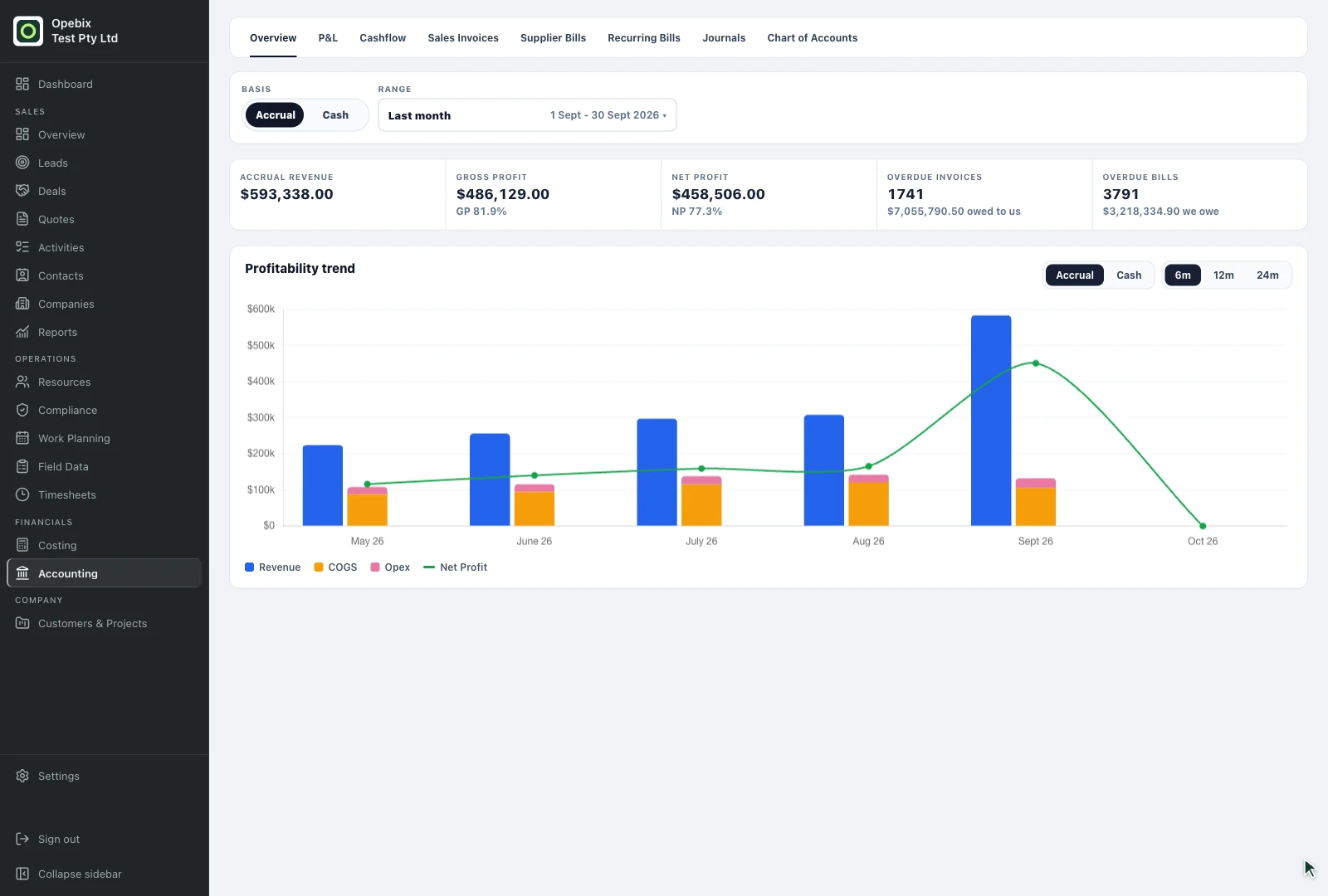
05 Finance

Bring the numbers closer to the work.

Review income, expenses and your cash position. Move from the accounting overview to sales invoices and the detail behind a posted invoice.

  • Income and expense overview
  • Sales invoices and overdue visibility
  • Posted invoice details
Explore finance in a demo
Opebix Accounting · Overview and sales invoices
Actual product interface · Sample data
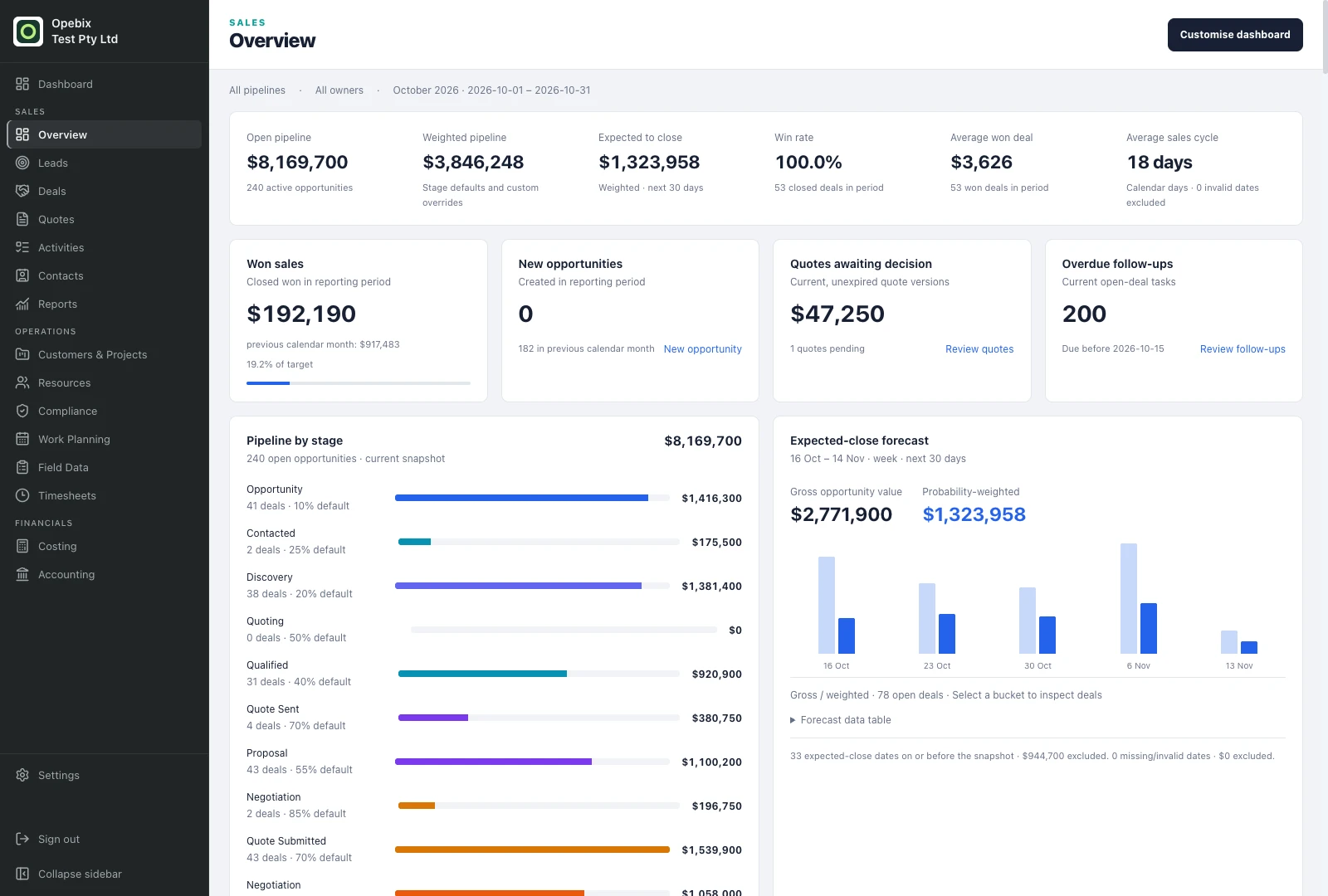
06 Insights

See the picture. Know the next move.

Review sales performance without exporting another spreadsheet. Keep pipeline, forecasts and conversion trends in view, then explore the figures in the Sales workspace.

  • Pipeline and forecast visibility
  • Win rates and sales trends
  • Reporting periods you can compare
Explore insights in a demo
Opebix Sales overview · Performance
Actual Opebix Sales overview with demonstration pipeline, forecast and sales performance information in Test Pty Ltd.

Sales overview · Performance · Actual Opebix interface · Sample data

Actual product interface · Sample data
Opebix AI rainbow logo
Opebix AIYour in-app assistant

Less searching.
A clearer next step.

Ask in everyday language. Find the right information, understand how things connect and keep moving through Opebix with guidance close at hand.

Explore Opebix AI in a demo

An optional add-on, currently in a controlled rollout. Ask about availability for your team.

START WITH A SIMPLE QUESTION
  1. Find your way

    “How do customers, projects and jobs fit together?”

    Understand the workflow and where to go next.

  2. See what needs attention

    “Which jobs are still pending?”

    Find records, overdue follow-ups and outstanding invoices.

  3. Take the next step

    “Help me prepare a follow-up task for this deal.”

    Review the proposed details before you confirm a supported change.

Example questions to explore in a demo.

Across SalesOperationsAccounting

Your access applies. You review and confirm supported changes.

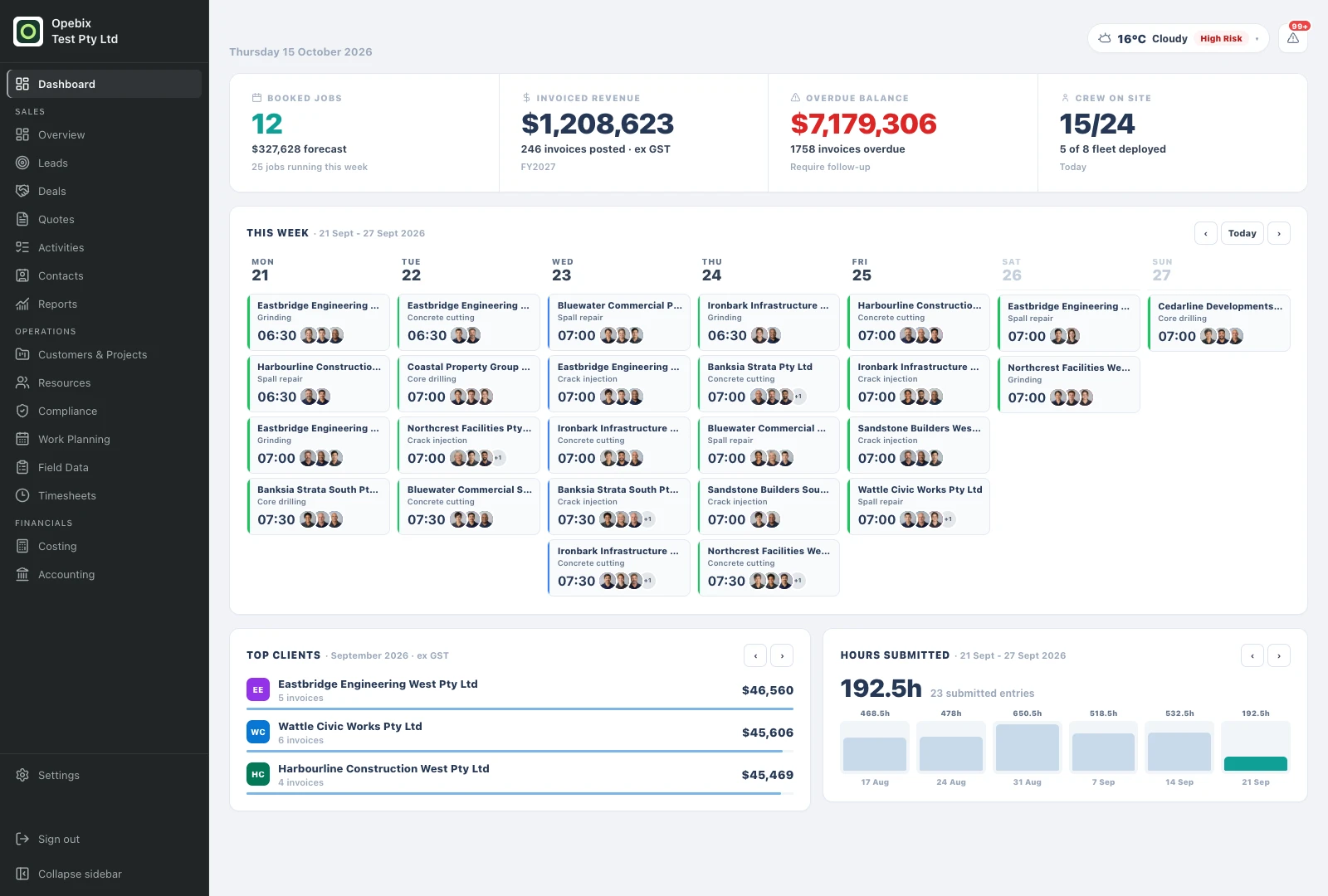
A CLEARER VIEW FOR BETTER DECISIONS

Know what’s happening
across your business.

For owners, general managers and operations teams. See what needs your attention, without chasing another update.

Actual Opebix Dashboard with demonstration booked jobs, invoiced revenue, overdue balance, crew on site, weekly work and submitted hours in Test Pty Ltd.

Dashboard · Business overview · Actual Opebix interface · Sample data

Dashboard · Actual Opebix interface · Sample data
Booked jobsInvoiced revenueOverdue balanceCrew on siteWeekly workSubmitted hours

One dashboard for your work, people and business performance.

THE TOOLS YOU KNOW. A MORE CONNECTED BUSINESS.

Your favourite tools.
Part of the bigger picture.

Keep the tools you love in the conversation. We’re planning connections that bring your work, accounts and communications closer together.

Talk integrations with us
OpebixOne connected workspace

Monday.com

Work management

Planned

Xero

Accounting

Planned

Gmail

Email & conversations

Planned

Outlook

Email & conversations

Planned

MYOB

Accounting

Planned
On the roadmap. These integrations are not yet available; release dates are to be confirmed.Logo credits
PRICING

Start with your business.
Build the right fit.

Tell us about your team, your workflows and where you want to go. We’ll discuss scope, onboarding and pricing with you.

Let’s talk pricing A conversation, with no commitment.
A LITTLE MORE CLARITY

Good questions.
Straight answers.

Getting to know Opebix? Start here.

What can Opebix AI help with?

Opebix AI can explain supported workflows, find records you have access to and surface items such as overdue follow-ups, pending jobs and outstanding invoices. Selected actions, including follow-up tasks, worker allocations and draft invoices, require your review and confirmation. It is an optional add-on currently in a controlled rollout; ask about availability in your demo.

What is Opebix?

Opebix is a connected business platform for customers, sales, projects, team coordination and financial visibility. It connects managers with the people delivering the work, whether they work at a venue, a customer location, a project site or in the office.

Which industries can use Opebix?

Opebix’s shared tools can support workflows in hospitality, cleaning and facilities, events and catering, professional services, trades and construction. We’ll explore your requirements in a demo and discuss how customer management, work planning, team records, forms, timesheets and invoicing could fit your business.

Can we bring our existing processes?

Use your demo to walk through your current systems, data and ways of working. We will discuss fit and onboarding requirements before you decide on next steps.

Does Opebix connect to other software?

Integrations are on the roadmap. Monday.com, Xero, Gmail, Outlook and MYOB connections are planned, with no release date announced. They are not currently available.

What happens after I request a demo?

The Opebix team will use your details to discuss your requirements and arrange a walkthrough. Submitting this form does not create an account or start a paid subscription.

YOUR NEXT CHAPTER STARTS HERE

Ready to run your
business differently?

See how Opebix can connect your customers, team and operations
into one connected workspace.

LET’S SEE WHAT’S POSSIBLE

Your business.
Your Opebix demo.

Tell us a little about your team and what you’re looking to improve. We’ll take it from there.

  1. 01
    Start with your needs

    Share how your business works today.

  2. 02
    See the connected picture

    Explore the workflows that matter to you.

  3. 03
    Talk through the next steps

    Discuss fit, onboarding and pricing.

Book a Demo

* Required fields

No commitment. Just a conversation about your business.